Anzeige


Calculate the Map Size on a Monitor

A calculator for determining the size of a map on a monitor or screen in pixels. Enter the scale and the pixels per inch (ppi) or centimeters and one of the three other values. Here you can calculate the scale and calculate pixels per inch/cm. An average value for ppi is 72.


Scale: 1 : 
Pixel per :

Real distance:
Distance on the map:
Size in Pixels:


C deletes the three results.

Example: at a scale of 1:5000, 10 centimeters on the map always correspond to 500 meters in reality. This is independent of the screen size, provided the scale is correct. With a standard screen resolution of 72 pixels per inch, this corresponds to 283 pixels. This calculator is especially made for this pixel calculation.


Example sclaes
Maps © OpenStreetMap contributors, published under CC-BY-SA 2.0

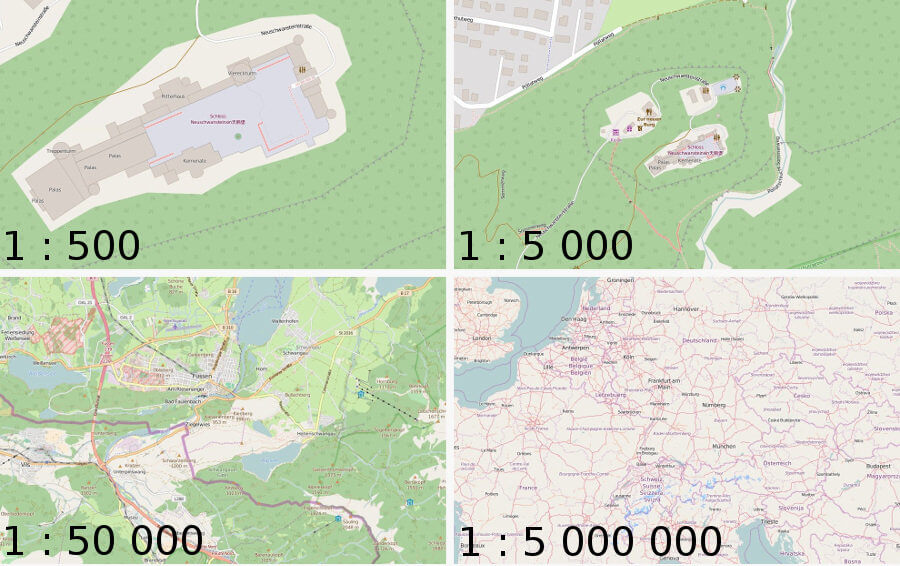
Here are four examples of different scales on maps that are each 446 pixels wide. This is for illustrative purposes only and is not to scale unless your screen happens to have the appropriate resolution by chance.

The scale of a map of course depends primarily on what is being depicted and for whom. This includes the size of the region and the intended audience - like how the people using the map typically travel. Hiking maps commonly have a different scale than maps for drivers. Large scales are those with a small ratio of 1:x. The four maps above are arranged from largest to smallest scale. A large scale shows many details of a small region, while a small scale shows fewer details of a large region. All four maps are centered on the same point of interest: Neuschwanstein Castle. This was chosen because many different scales can be useful for this location. On the one hand, people hike in and around the castle; on the other hand, it is also a well-known attraction far beyond the region. Of course, there are many other sights that fit this description and are therefore found on maps of varying scales.


Anzeige